학원/수업 기록
TBOARD 수정, CATE 생성(카테고리) 실습
60cod
2022. 8. 25. 10:54
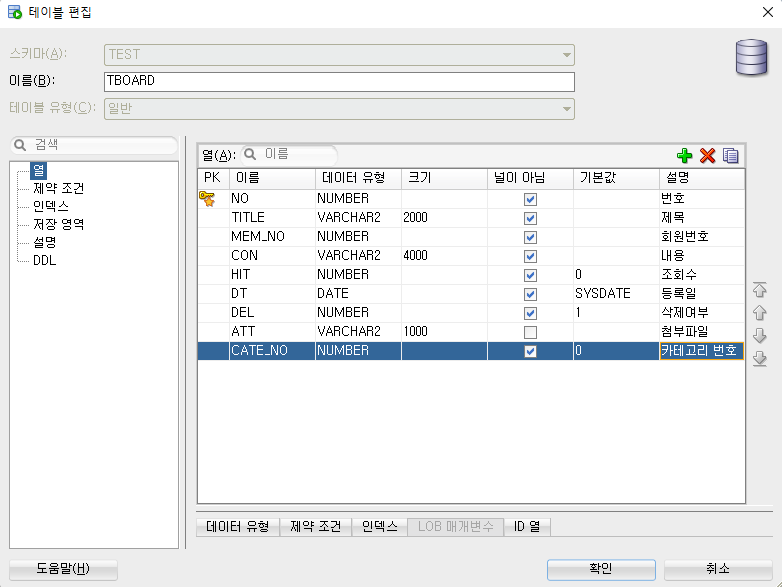
TBOARD 수정
카테고리 번호 컬럼 추가
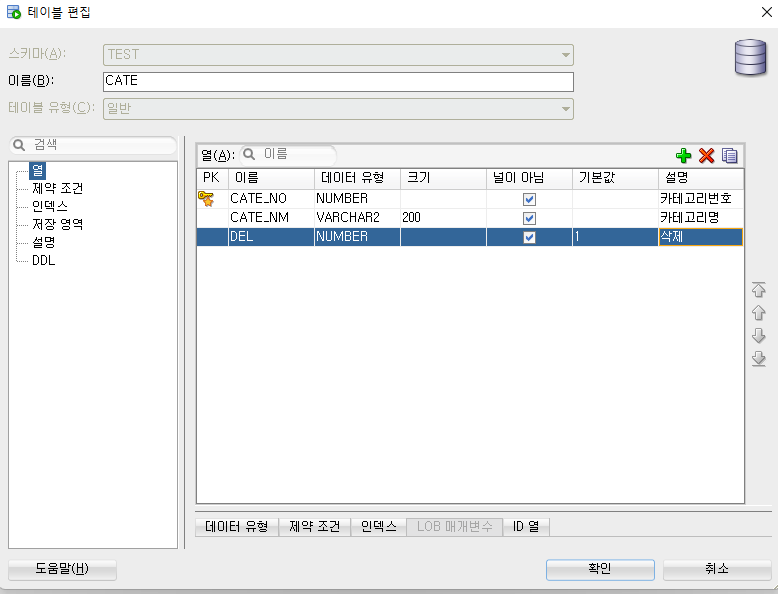
새 테이블 CATE 만들기
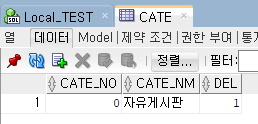
0번 자유게시판 추가
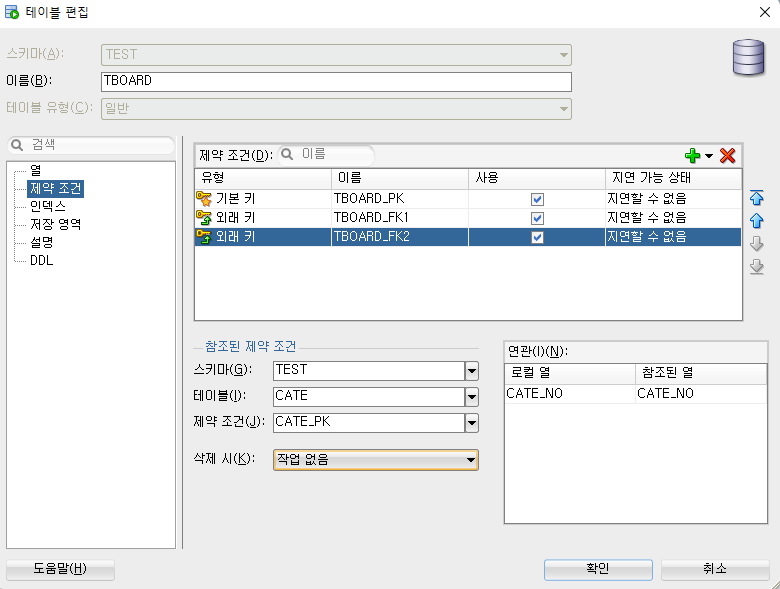
새 외래키 달아서 티보드와 연결
CATE 시퀀스 만들어줌
혼자 풀어본 거라.. 맞는진 모름 근데 일단 잘 굴러감
ACateController
더보기
package com.spring.sample.web.testa.controller;

import java.util.HashMap;
import java.util.List;
import java.util.Map;

import org.springframework.beans.factory.annotation.Autowired;
import org.springframework.stereotype.Controller;
import org.springframework.web.bind.annotation.PathVariable;
import org.springframework.web.bind.annotation.RequestMapping;
import org.springframework.web.bind.annotation.RequestMethod;
import org.springframework.web.bind.annotation.RequestParam;
import org.springframework.web.bind.annotation.ResponseBody;
import org.springframework.web.servlet.ModelAndView;

import com.fasterxml.jackson.databind.ObjectMapper;
import com.spring.sample.common.service.IPagingService;
import com.spring.sample.web.testa.dao.IACateDao;

@Controller
public class ACateController {
	@Autowired
	public IACateDao iACateDao;

	@Autowired
	public IPagingService ips;

	@RequestMapping(value = "ACategory")
	public ModelAndView aob(ModelAndView mav) {
		mav.setViewName("testa/category/cate");

		return mav;
	}

	@RequestMapping(value = "/ACategoryList",
			method = RequestMethod.POST,
			produces = "text/json;charset=UTF-8")
		@ResponseBody
		public String ACategory (
				@RequestParam HashMap<String, String> params) throws Throwable {
		      ObjectMapper mapper = new ObjectMapper ();

		      Map<String, Object> model = new HashMap<String, Object>();

		      int cnt = iACateDao.getInt("C.getCCnt", params);

		      HashMap<String, Integer> pd
				= ips.getPagingData(Integer.parseInt(params.get("page")),
									cnt, 10, 5); //페이지 정보

		      params.put("start", Integer.toString(pd.get("start")));
		      params.put("end", Integer.toString(pd.get("end")));

		      List<HashMap<String, String>> list = iACateDao.getList("C.getCList", params);

		      model.put("list", list);
		      model.put("pd", pd);

		      return mapper.writeValueAsString(model);

		   }

	@RequestMapping(value = "/ACAction/{gbn}",
	         method = RequestMethod.POST,
	         produces = "text/json;charset=UTF-8")
	   @ResponseBody
	   public String ACAction(
	         @PathVariable String gbn,
	         @RequestParam HashMap<String, String> params) throws Throwable {
	      ObjectMapper mapper = new ObjectMapper ();

	      Map<String, Object> model = new HashMap<String, Object>();

	      int cnt = 0;

	      try {

	         switch(gbn) {
	         case "insert" : cnt = iACateDao.insert("C.insertC", params);
	            break;
	         case "update" : cnt = iACateDao.update("C.updateC", params);
	            break;
	         case "delete" : cnt = iACateDao.update("C.deleteC", params);
	            break;
	         }

	         if(cnt > 0) {
	            model.put("msg", "success");
	         } else {
	            model.put("msg", "fail");
	         }
	      } catch (Exception e) {
	         e.printStackTrace();
	         model.put("msg", "error");
	      }

	      return mapper.writeValueAsString(model);
	   }
}
IACateDao
더보기
package com.spring.sample.web.testa.dao;

import java.util.HashMap;
import java.util.List;

public interface IACateDao {
	//이렇게 쌍으로 다님
	//숫자 취득
	public int getInt(String sql) throws Throwable; //값 안 받고 조회만
	public int getInt(String sql, HashMap<String, String> params) throws Throwable;

	//문자열 취득
	public String getString(String sql) throws Throwable;
	public String getString(String sql, HashMap<String, String> params) throws Throwable;

	//HashMap 취득
	public HashMap<String, String> getMap(String sql) throws Throwable;
	public HashMap<String, String> getMap(String sql, HashMap<String, String> params) throws Throwable;

	//문자열 취득
	public List<HashMap<String, String>> getList(String sql) throws Throwable;
	public List<HashMap<String, String>> getList(String sql, HashMap<String, String> params) throws Throwable;

	//등록
	public int insert(String sql) throws Throwable;
	public int insert(String sql, HashMap<String, String> params) throws Throwable;

	//수정
	public int update(String sql) throws Throwable;
	public int update(String sql, HashMap<String, String> params) throws Throwable;

	//삭제
	public int delete(String sql) throws Throwable;
	public int delete(String sql, HashMap<String, String> params) throws Throwable;

}
ACateDao
더보기
package com.spring.sample.web.testa.dao;

import java.util.HashMap;
import java.util.List;

import org.apache.ibatis.session.SqlSession;
import org.springframework.beans.factory.annotation.Autowired;
import org.springframework.stereotype.Repository;

@Repository
public class ACateDao implements IACateDao {
	@Autowired
	public SqlSession sqlSession;

	@Override
	public int getInt(String sql) throws Throwable {
		return sqlSession.selectOne(sql);
	}

	@Override
	public int getInt(String sql, HashMap<String, String> params) throws Throwable {
		return sqlSession.selectOne(sql, params);
	}

	@Override
	public String getString(String sql) throws Throwable {
		return sqlSession.selectOne(sql);
	}

	@Override
	public String getString(String sql, HashMap<String, String> params) throws Throwable {
		return sqlSession.selectOne(sql, params);
	}

	@Override
	public HashMap<String, String> getMap(String sql) throws Throwable {
		return sqlSession.selectOne(sql);
	}

	@Override
	public HashMap<String, String> getMap(String sql, HashMap<String, String> params) throws Throwable {
		return sqlSession.selectOne(sql, params);
	}

	@Override
	public List<HashMap<String, String>> getList(String sql) throws Throwable {
		return sqlSession.selectList(sql);
	}

	@Override
	public List<HashMap<String, String>> getList(String sql, HashMap<String, String> params) throws Throwable {
		return sqlSession.selectList(sql, params);
	}

	@Override
	public int insert(String sql) throws Throwable {
		return sqlSession.insert(sql);
	}

	@Override
	public int insert(String sql, HashMap<String, String> params) throws Throwable {
		return sqlSession.insert(sql, params);
	}

	@Override
	public int update(String sql) throws Throwable {
		return sqlSession.update(sql);
	}

	@Override
	public int update(String sql, HashMap<String, String> params) throws Throwable {
		return sqlSession.update(sql, params);
	}

	@Override
	public int delete(String sql) throws Throwable {
		return sqlSession.delete(sql);
	}

	@Override
	public int delete(String sql, HashMap<String, String> params) throws Throwable {
		return sqlSession.delete(sql, params);
	}


}
Cate_SQL.xml
더보기
<?xml version="1.0" encoding="UTF-8"?>
<!DOCTYPE mapper PUBLIC "-//mybatis.org//DTD Mapper 3.0//EN" "http://mybatis.org/dtd/mybatis-3-mapper.dtd">
<mapper namespace="C">
	<select id="getCCnt" parameterType="hashmap"
		resultType="Integer">
		SELECT COUNT(*) AS CNT
		FROM CATE
		WHERE DEL = 1
		<if test="searchTxt != null and searchTxt != ''">
			<choose>
				<when test="searchGbn eq 0">
					AND CATE_NO = #{searchTxt}
				</when>
				<when test="searchGbn eq 1">
					AND CATE_NM LIKE '%' || #{searchTxt} || '%'
				</when>
			</choose>
		</if>
	</select>

	<select id="getCList" parameterType="hashmap"
		resultType="hashmap">
		SELECT C.CATE_NO, C.CATE_NM
		FROM(SELECT CATE_NO, CATE_NM,
					ROW_NUMBER() OVER(ORDER BY CATE_NO DESC) AS RNUM
			FROM CATE
			WHERE DEL = 1
			<if test="searchTxt != null and searchTxt != ''">
				<choose>
					<when test="searchGbn eq 0">
						AND CATE_NO = #{searchTxt}
					</when>
					<when test="searchGbn eq 1">
						AND CATE_NM LIKE '%' || #{searchTxt} || '%'
					</when>
				</choose>
			</if>) C
		WHERE C.RNUM BETWEEN #{start} AND #{end}
	</select>

	<insert id="insertC" parameterType="hashmap">
		INSERT INTO CATE (CATE_NO, CATE_NM)
		VALUES(CATE_SEQ.NEXTVAL, #{con})
	</insert>

	<select id="getC" parameterType="hashmap" resultType="hashmap">
		SELECT CATE_NO, CATE_NM
		FROM CATE
		WHERE DEL = 1
		AND CATE_NO = #{no}
	</select>

	<update id="deleteC" parameterType="hashmap">
		UPDATE CATE SET DEL = 0
		WHERE CATE_NO = #{no}
	</update>

	<update id="updateC" parameterType="hashmap">
		UPDATE CATE SET CATE_NM = #{con}
		WHERE CATE_NO = #{no}
	</update>
</mapper>
testa - category - category.jsp
더보기
<%@ page language="java" contentType="text/html; charset=UTF-8"
pageEncoding="UTF-8"%>
<%@ taglib prefix="c" uri="http://java.sun.com/jsp/jstl/core" %>
<!DOCTYPE html>
<html>
<head>
<meta charset="UTF-8">
<title>한줄게시판</title>
<!-- Common CSS -->
<link rel="stylesheet" type="text/css" href="resources/css/common/cmn.css" />
<!-- Popup CSS -->
<link rel="stylesheet" type="text/css" href="resources/css/common/popup.css" />
<style type="text/css">
#searchTxt {
width : 161px;
height: 28px;
padding: 0px 2px;
text-indent: 5px;
vertical-align: middle;
border : 1px solid #d7d7d7;
outline-color : #70adf9;
}
.search_area {
width : 800px;
text-align: right;
margin : 0 auto;
}
.board_area {
width : 800px;
margin : 0 auto;
}
.wrap {
width : 800px;
margin : 0 auto;
}
.mtb {
margin : 5px 0px;
}
.login {
vertical-align: baseline;
}
.con {
width : calc(100% - 22px);
height : 60px;
border : 1px soild #d7d7d7;
resize : none;
padding : 10px;
}
.update {
display : none;
}
.con_td {
font-size : 0;
}
.paging_area {
display: block;
position: relative;
left : 0;
margin-bottom : 10px;
}
.search_area {
text-align : center;
}
body {
overflow: auto;
}
</style>
<!-- JQuery -->
<script type="text/javascript"
src="resources/script/jquery/jquery-1.12.4.min.js"></script>
<!-- Popup JS -->
<script type="text/javascript"
src="resources/script/common/popup.js"></script>
<!-- Slimscroll JS -->
<script type="text/javascript"
src="resources/script/jquery/jquery.slimscroll.js"></script>
<script type="text/javascript">
$(document).ready(function() {
reloadList();
$("#insertBtn").on("click", function() {
if($.trim($("#con").val()) == "") {
makeAlert("알림", "내용을 입력하세요.", function() {
$("#con").focus();
});
} else {
action("insert");
}
});
//페이징 클릭 시
$(".paging_area").on("click", "span", function() {
$("#page").val($(this).attr("page"));
//기존 값 유지
$("#searchGbn").val($("#oldGbn").val());
$("#searchTxt").val($("#oldTxt").val());
reloadList();
});
// 검색 버튼 클릭 시
// 기존 것 넘겨줘도 됨
$("#searchBtn").on("click", function() {
$("#page").val("1");
//기존 값 새 값으로 변경
$("#oldGbn").val($("#searchGbn").val());
$("#oldTxt").val($("#searchTxt").val());
reloadList();
});
// 목록의 삭제 버튼 클릭시
$("tbody").on("click", ".delete_btn", function() {
// 삭제 버튼 눌렀을 때 그 글의 번호를 가져가려면 그 버튼을 가진 td의 tr까지 올라가야 함
// 두 단계 올라가야 하고 길어서 변수에 담기
var no = $(this).parent().parent().attr("no");
// 팝업
makePopup({
title : "알림",
contents : "삭제 하시겠습니까?",
buttons : [{
name : "삭제",
func:function() {
// 삭제 전에 번호 가져가야 함
$("#no").val(no);
action("delete");
closePopup(); // 제일 위의 팝업 닫기
}
}, {
name : "취소"
}]
});
});
// 목록의 수정 버튼 클릭 시
$("tbody").on("click", ".update_btn", function() {
var no = $(this).parent().parent().attr("no");
$("#no").val(no);
// eq(인덱스 번호) : 자식들 중 인덱스 몇 번째인지 찾아서 취득
// 댓글 입력 칸에 수정하려고 클릭한 댓글 내용이 들어옴
var con = $(this).parent().parent().children().eq(1).html();
// 수정 내용 넣기 전 <>변환
con = con.replace(/</gi, "<");
con = con.replace(/>/gi, ">");
$("#con").val(con);
// 등록 버튼 감추기 + 수정,취소 버튼 나타나게 하기
$(".insert").hide();
$(".update").show();
//작성 영역에 포커스
$("#con").focus();
});
// 수정 영역의 취소 버튼 클릭 시
// 취소 버튼은 없었던 일로 하면 됨.
// 취소 버튼은 thead에 있음
$("thead #cancelBtn").on("click", function() {
// 입력 내용 초기화
$("#no").val("");
$("#con").val("");
// 등록 버튼 나타나기 + 수정,취소 버튼 감추기 (반대로 하는 거임)
$(".insert").show();
$(".update").hide();
});
// 수정 영역의 수정 버튼 클릭 시
$("thead #updateBtn").on("click", function() {
action("update");
});
});
var msg = {
"insert" : "등록",
"update" : "수정",
"delete" : "삭제",
}
function action(flag) {
// con의 <,> 들을 웹 문자로 변환 -> 디비에도 저 글자로 들어감
$("#con").val($("#con").val().replace(/</gi, "<"));
$("#con").val($("#con").val().replace(/>/gi, ">"));
// Javascript Object에서의 [] : 해당 키값으로 내용을 불러오거나 넣을 수 있다. Java의 Map에서 get, put역할
console.log(msg[flag]);
var params = $("#actionForm").serialize(); // 보낼수있는 형태로 만든 후 보낸다
$.ajax({
url : "ACAction/" + flag, // 경로
type : "POST", // 전송방식(GET : 주소형태, POST : 주소 헤더형태)
dataType : "json", // 데이터 형태
data : params, // 보낼 데이터
success : function(res) {// 성공했을때 경과를 res에 받고 함수 실행
switch(res.msg) {
case "success" :
// 내용 초기화
$("#con").val("");
$("#no").val("");
// 목록 재조회
switch(flag) {
case "insert" :
case "delete" :
// 조회 데이터 초기화
$("#page").val("1");
$("#searchGbn").val("0");
$("#searchTxt").val("");
$("#oldGbn").val("0");
$("#oldTxt").val("");
break;
case "update" :
//기존 값 유지
$("#searchGbn").val($("#oldGbn").val());
$("#searchTxt").val($("#oldTxt").val());
// 수정한 뒤 다시 등록 버튼 활성화 시키기
// 입력 내용 초기화
$("#no").val("");
$("#con").val("");
// 등록 버튼 나타나기 + 수정,취소 버튼 감추기 (반대로 하는 거임)
$(".insert").show();
$(".update").hide();
break;
}
reloadList();
break;
case "fail" :
makeAlert("알림", msg[flag] + "에 실패하였습니다.");
break;
case "error" :
makeAlert("알림", msg[flag] + " 중 문제가 발생하였습니다.");
break;
}
},
error : function(request, status, error) { // 실패했을때 함수 실행
console.log(request.responseText); // 실패 상세내역
}
}); // Ajax End
} // action Function End
//목록 조회 호출
function reloadList() {
var params = $("#searchForm").serialize();
$.ajax({
url: "ACategoryList",
type: "POST",
dataType: "json",
data : params,
success: function(res) {
drawList(res.list);
drawPaging(res.pd);
},
error : function(request, status, error) {
console.log(request.responseText);
}
});
}
function drawList(list) {
var html = "";
for(var data of list) {
html += "<tr no=\"" + data.CATE_NO + "\">";
html += "<td>" + data.CATE_NO + "</td>";
html += "<td>" + data.CATE_NM + "</td>";
html += "<td>";
html += "<div class=\"cmn_btn mtb update_btn\">수정</div><br/>";
html += "<div class=\"cmn_btn mtb delete_btn\">삭제</div>";
html += "</td>";
html += "</tr>";
}
$("tbody").html(html); // 누적된 html을 tbody에 붙여야 함
}
// testa - T - list.jsp에서 그대로 가져옴
function drawPaging(pd) {
var html = "";
//처음
html += "<span class=\"page_btn page_first\" page=\"1\">처음</span>";
//이전
if($("#page").val() == "1") { //input에 들어가는 건 기본적으로 문자열이라 "1"
html += "<span class=\"page_btn page_prev\" page=\"1\">이전</span>";
} else {
html += "<span class=\"page_btn page_prev\" page=\"" + ($("#page").val() * 1 - 1) + "\">이전</span>";
//1 곱해주는 이유는 숫자로 만들어주는 것
}
for(var i = pd.startP; i <= pd.endP; i++) {
//현재 페이지와 i가 같을 때 bold 줌
if($("#page").val() * 1 == i) { //현재 페이지
html += "<span class=\"page_btn_on\" page=\"" + i + "\">" + i + "</span>";
} else { //다른 페이지
html += "<span class=\"page_btn\" page=\"" + i + "\">" + i + "</span>";
}
}
//다음
if($("#page").val() * 1 == pd.maxP) { //현재 페이지가 마지막 페이지라면
html += "<span class=\"page_btn page_next\" page=\"" + pd.maxP + "\">다음</span>";
} else {
html += "<span class=\"page_btn page_next\" page=\"" + ($("#page").val() * 1 + 1) + "\">다음</span>";
}
//마지막
html += "<span class=\"page_btn page_last\" page=\"" + pd.maxP + "\">마지막</span>";
$(".paging_area").html(html);
}
</script>
</head>
<body>
<div class="wrap">
<div class="board_area">
<!-- 작성 또는 로그인 -->
<!-- 목록 -->
<table class="board_table">
<colgroup>
<col width="100" />
<col width="*" />
<col width="100" />
</colgroup>
<thead>
<tr>
<th>카테고리 이름 등록/수정</th>
<td class="con_td">
<form action="#" id="actionForm">
<input type="hidden" name="no" id="no"/>
<textarea class="con" name="con" id="con"></textarea>
</form>
</td>
<th>
<div class="insert">
<div class="cmn_btn" id="insertBtn">등록</div>
</div>
<div class="update">
<div class="cmn_btn mtb" id="updateBtn">수정</div><br/>
<div class="cmn_btn mtb" id="cancelBtn">취소</div>
</div>
</th>
</tr>
<tr>
<th>카테고리 번호</th>
<th>카테고리 이름</th>
<th> </th>
</tr>
</thead>
<tbody>
<!-- reloadList로 그릴 거임 -->
<!-- <tr>
<td>홍길동</td>
<td>테스트</td>
<td>10:16</td>
<td>
<div class="cmn_btn mtb">수정</div><br/>
<div class="cmn_btn mtb">삭제</div>
</td>
</tr> -->
</tbody>
</table>
<!-- 페이징 -->
<div class="paging_area"></div>
</div>
<div class="search_area">
<!-- 검색어 유지용 -->
<input type="hidden" id="oldGbn" value="0" />
<input type="hidden" id="oldTxt" />
<form action="#" id="searchForm">
<input type="hidden" name="page" id="page" value="1" />
<select name="searchGbn" id="searchGbn">
<option value="0">카테고리 번호</option>
<option value="1">카테고리 이름</option>
</select>
<input type="text" name="searchTxt" id="searchTxt" />
<div class="cmn_btn_ml" id="searchBtn">검색</div>
</form>
</div>
</div>
</body>
</html>